UnLock Math Geometry: Bringing High School Math Online
This post on bringing high school math online is made possible with a subscription to the UnLock Math Geometry course at UnLock Math for review as part of the Homeschool Review Crew.

I must admit that as a student, I loved math.
However, I do not always enjoy teaching it to my boys.
That’s why I am glad when there are some automated options for high school math which the boys can use.
Two years ago, my son used UnLock Math’s Pre-Algebra program which we reviewed.
This year, he is starting the journey with the new Geometry program.
UnLock Math Geometry: an Online High School Math Option
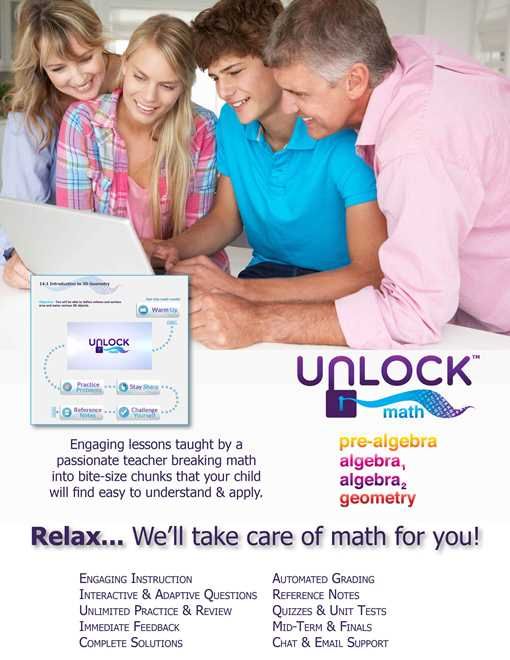
UnLock Math is a full curriculum for homeschool students.
All of the major concepts considered standards for the United States and Canada are incorporated into the class scope and sequence.
This program launched 2 years ago with pre-Algebra and Algebra I. Since then, they have added Algebra II and are now launching Geometry.
The instructor, Alesia Blackwood, is passionate about teaching math.
With years of experience teaching high school math, she seeks to reignite a love of learning math in her students.
What UnLock Math Geometry Covers

This course is divided up into 12 different units.
Prerequisite Skills (8 Lessons)
Logic and Proofs (5 Lessons)
Distance and Length (5 Lessons)
Angle, Lines, and Transversals (8 Lessons)
Triangles (11 Lessons)
Polygons (7 Lessons)
Circles (6 Lessons)
Perimeter (6 Lessons)
Area (9 Lessons)
Geometry in the Coordinate Plane (12 Lessons)
Triangles (10 Lessons)
Circles Part II (8 Lessons)
Within each of the units, there are multiple lessons.
Every 2 to 3 lessons are followed by a quiz to further assess learning.
At the end of a unit, there is a unit review and unit test.
How UnLock Math Works
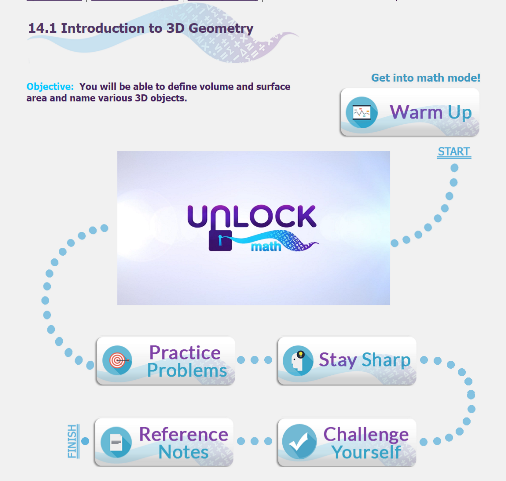
Each lesson has a similar flow.
The student spends a few minutes warming up so they are ready for math.
Then there is an instructional video for the particular lesson.
Practice problems focus on what is presented in the new material.
Stay sharp includes other skills previously taught (so a review!)
Challenge Yourself has the student really working their brain.
For those who like to have text to read, there is a pdf file titled Reference Notes.
This is particularly helpful when trying to recall something you’ve just seen demonstrated. Students read them online or can print them out to create their own textbook for future reference.
Listen to Alesia Talk About the Program
Our Thoughts on UnLock Math Geometry for High School Math
As it is summertime, I have not been insisting upon daily work for our homeschool subjects. However, my rising 9th grader is making steady progress on this one.
The overall format is the same as it was for pre-algebra, so he has not had a learning curve on that. However, they have made updates to the platform which have glitched at times for us. You just have to ‘love’ technology sometimes!
Things I love about UnLock Math:
The course flows well and is easy to learn how to navigate.
UnLock Math courses include all topics required by most school districts.
While we plan to homeschool for the long haul, I know there could be a time when attending a school may be a better fit. I want to make sure there is little question of his abilities and exposure to the topics and skills they consider important.
Questions with the verify button provide instant grading and feedback to the student. They can see why they have missed a problem so future ones may be easier to complete correctly.
The course grade book breaks everything down by section including when and how much time a student spent on the work.
This is great for moms like me with kids that are rushing or maybe complaining about how long it takes to do their work. You can show them exactly how long it took.
And, if you have are transitioning them to being more independent, then you can verify the work is getting done when it is scheduled.
When selected, students can see progress for a unit on their dashboard.

My son is not as enthusiastic about the program as I am. I recognize that a large reason is that he wants to take the path of least resistance. Plus, he believes we should have a full summer break with no school work. So he tends to rush through the problems, occasionally making errors.
Would I recommend UnLock Math?
Yes, with a few “ifs” included.
Parents who are worried they do not have the skills needed to teach high school math will benefit from Alesia’s years of teaching students. She does a great job walking through the material with a lovely, upbeat personality.
Those parents who want to encourage an older student to be more independent will enjoy the freedom this program can provide.
While some book-based programs can be handed off to your student for completion, the task of grading still falls on you. UnLock Math does all the grading and record-keeping for you.
This is a wonderful product when you have a student that is able to do computer-based work without distraction.
If you have a child who quickly leaves their work to play on the computer or they are not fully ready to be independent, then you would need to be physically present while they do the work. (I’ve had my son using MY computer while I prep dinner in the kitchen for this very reason.)>
Do your kids enjoy online courses?
Is UnLock Math Geometry of interest for your family?
Don’t just take my word for how we found this to be. Visit UnLock Math Reviews on the Homeschool Review Crew website to see what other homeschooling parents thought about this book.