My Memories Suite ~ Digital Scrapbooking Made Easy!
I have been, or can be if you click on a link and make a purchase, compensated via a cash payment, gift, or something else of value for writing this post. Regardless, I only recommend products or services I use personally and believe will be good for my readers.
I have a large box full of scrapbooking supplies with good intentions of putting together treasures that everyone in the family would enjoy looking through time and again. But, it sits untouched. Not because I don’t want to pull it together.
Rather, I suffer from a three fold handicap.
- Most of our pictures have been digital in the past 5 or so years and somehow printing them out rarely happens.
- I feel like I need dedicated space to even begin to tackle a scrapbooking project.
- Finally, I’m convinced that it will take me forever to crank out a few pages. Somehow I never have ‘found’ the time.
I’ve seen some bloggers talk about digital scrapbooking, but never made the leap. In some ways, this blog is a scrapbook of our lives. It just isn’t in the same pretty format I’d long to create for our family’s priceless memories.
Now I’ve had the opportunity to use software made especially for people like me who suffer from that three-fold handicap. And, I have to say that I LOVE this program so far!
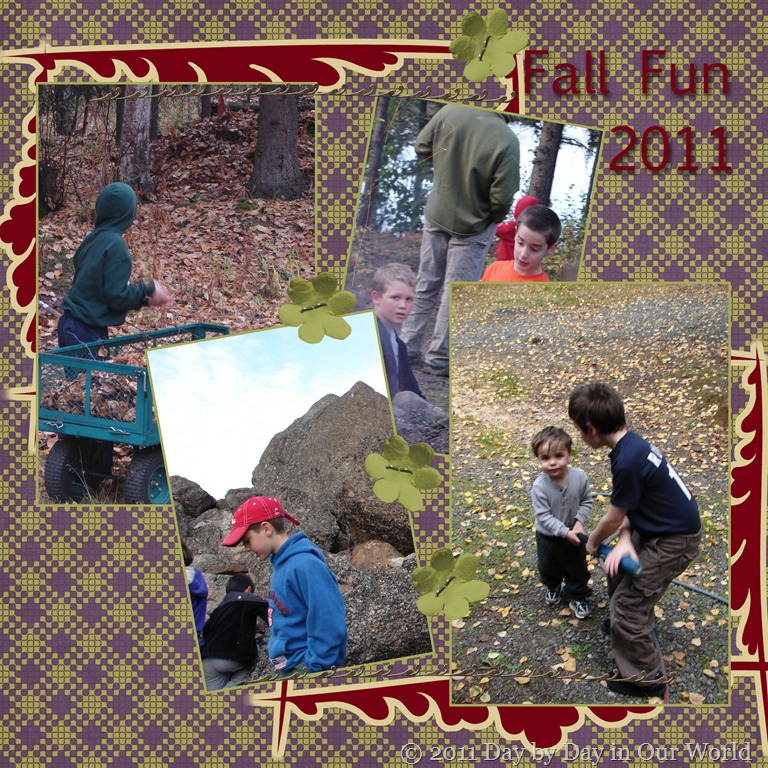
The My Memories Suite scrapbook software comes with a sampling of template designs with things like a pretty background and embellishments all ready on each page. Using one of those templates is so easy, you just pick what photos to add and drag them into place. You might need to do a little fussing to get the section you want visible, but it was easy to figure out.

Even though it’s a template, you can customize a bit. For this one, I added the “Fall Fun 2011” to the page.
On the My Memories website, you can find several freebies to add to your software (or use with other photo editing programs.) I downloaded a few to test out. Now, unlike the templates, they were not as easy to figure out. My first problem was finding where they’d gone. Hint ~ Background papers will be found under the templates option for Background papers. Quick Pages are found under embellishments (possibly with the need to select ‘more’ to find the one you want.)
Now, unlike the templates, they were not as easy to figure out. My first problem was finding where they’d gone. Hint ~ Background papers will be found under the templates option for Background papers. Quick Pages are found under embellishments (possibly with the need to select ‘more’ to find the one you want.)
This particular quick page did not have the same drag and drop into place feature that the templates had. I had to position my photo and then by right clicking on the frame bring the frame to the foreground. I also added the text found on the tree.

This next quick page I used was more like a fancy background paper. I decided to add a simple frame to each photo as well as the brief text in the header.

Finally, I tried doing one from scratch. I picked a photo layout that was available from a template. Then, going through the background pages option, I picked a background paper. Once I added a title using the Word Art option, I called it a night. It’s not ‘great’, but it is a start. And, the nice thing about digital scrapbooking is that you can go back and make changes so easily.

Once you’ve finished your pages, there are multiple ways to share. All of the ones above were made into jpeg format. But, I could spend a bit more time and add music and have my own video to watch. Or, I could have an album professionally printed. I’m seeing the potential for Christmas gifts already. I might even let the boys create their own pages to share, too. (And, I am so totally eyeing up the Scouting is for Boys kit. It could be my first purchase.)
My Memories Suite v2 digital scrapbooking software retails for $39.97. However, if you use the code STMMMS22922 , you will receive a $10 discount off the purchase of the My Memories Suite Scrapbook software and a $10 coupon for the MyMemories.com store – $20 value!)
You can find videos showing how to use the software on You Tube as well as visit the My Memories blog to see how others are using the software (and potentially win a prize.)

Disclaimer ~ We were provided with My Memories Suite software in order to complete this review. No other compensation was provided and the opinions expressed are our own. Purchases made using the coupon code may result in compensation, however.
Thanks for the info i love Scrapping too!
You really have a great blog! I love to be here every now and then. anyway i want to invite you to join our new community http://girlstalksociety.com where in you can share your blog posts, create new groups and meet new friends. We are also giving away Paypal Cash Gift Monthly For our Top 2 Active Girl Talkers – which is the most active girls in the community. You can be one of them if you join today. Godbless and Keep it up! I LOVE YOUR BLOG DEARLY. 🙂
Hi Laura,
Your scrapbooking looks fantastic! I might decide to jump in and try it one of these days.
Colleen
Thanks, Colleen. The software is easy to use. And, I have a code up for giveaway! So, feel free to enter and possibly win your own copy.
This is a great way to remember precious memories and times spent together. It can be passed on to the next generation.
This is an easy way to scrapbook…or should I say easier? I never got around to using the paper and embellishments that I spent so much money on…that is still sitting around in boxes. YES, BOXES! And the papers are set up in so many beautiful styles that it is sure to be appealing to everyone.
Linda,
I’ve got a big box of scrapbooking stuff. I’m thinking it’ll now be used for our homeschool efforts as this software is SO much easier (and no mess to clean up!)
I really like My Memories Suite. I’ve used it before, very easy.
I love your designs! I actually just recently fell in love with digital scrapbooking and it’s so much fun! I’ve had several designs on my site I made from free materials online. I even made myself a header on this site. http://www.dellechen.blogspot.com
Come visit me too. Followed you btw!
ronadelle
http://www.ronadelle.blogspot.com
Thanks for the lovely comment. I made my own header a while back, but just might attempt a new one in this software.
Sounds neat…I might just have to give it a try. Thanks for the review.
i want to give it a try
What a great idea! I need to do this, I have SO many pictures just sitting here on my laptop!
New GFC Follower from About A Mom! Please follow back when you can. Thanks!
http://GrandmaReviews.com
I would love to be able to easily chronicle our lives…this seems like great software!