Homeschool Planet is an Amazing Online Homeschool Planner
I have been, or can be if you click on a link and make a purchase, compensated via a cash payment, gift, or something else of value for writing this post. Regardless, I only recommend products or services I use personally and believe will be good for my readers.
This post, Homeschool Planet is an Amazing Online Homeschool Planner, was made possible with the chance to review the Homeschool Planet from Homeschool Buyers Co-op as part of the Schoolhouse Review Crew.
The need to organize our lives is present regardless of what calling we are answering. Homeschooling presents a unique need to not only balance the requirement to schedule work for the kids as well as balance it with other aspects of our lives.
I have used a LOT of different planners to achieve some balance between tracking assignments and all of the different appointments and meetings we have in the family. None of them are fully integrated in one spot, so I end up with things in multiple places. Assignments for the boys are mostly in a database program, but I sometimes make adjustments on a paper schedule for them. Grades go into the same database which allow me to pull semester grades for reporting to our charter school. But, life events (dental or doctor appointments, Boy Scouts, parties, church events, etc.) go on my phone where I see it but others don’t.
Is it any wonder that I do NOT feel super organized?

What is Homeschool Planet?
In a nutshell, Homeschool Planet is a one stop calendar solution for the busy homeschool family.
You can enter assignments and track grades for them along with inputting family calendar entries like a dental appointment or recurring meetings (e.g. Boy Scouts for us.) You can even track your shopping list and have it sent (via text) to your spouse!
This is an online homeschool planner that is written BY homeschoolers FOR homeschoolers which is constantly evolving to meet the needs of their users.
Okay…more specifics might be needed….
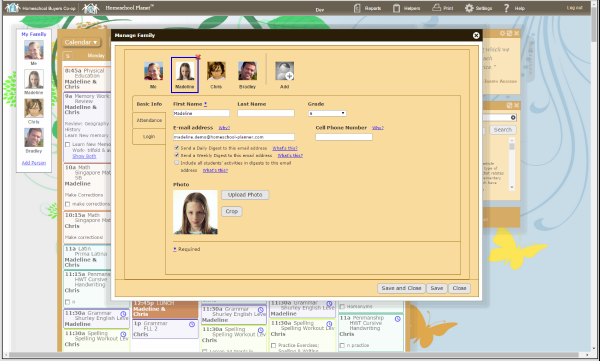
When you begin with Homeschool Planet, you will want to set up the family. Enter their information (including a cell phone number if you it) and upload a photo to make it fully personalized. Note that there are ‘show me’ video options for many of the sections so you can see it in action before your first use or as a refresher if it has been a while. This system is really made with the busy homeschool mom in mind!

Once you have your school year established, you can visit the subject tab in settings to add courses and indicate whether they are core or not. Each class can get its own color to help with visual discernment of what needs to be done on any given day. There is also a secondary tab for category where you will find wonderful things like chores, church, field trips and scouts.
Other things you can determine in the settings is whether to track hours spent (which can be overridden by individual class), elect to share with an external calendar (e.g. a Google one that a family member uses), edit the date/time/background, determine when to send email reminders for the day/week schedule, and input your school’s information.
The system has three major subdivisions available in a drop down menu: Calendar, Planner, and Resources.
The calendar can be by the day, week or month depending upon your needs. You can show it for all family members, just one particular family member, or select a subset of family members. If you don’t want to see weekends, you can hide those days from view. The same goes for showing only daytime hours versus a 24 hour day. Depending upon the particular event, you can have a different color assigned to it.
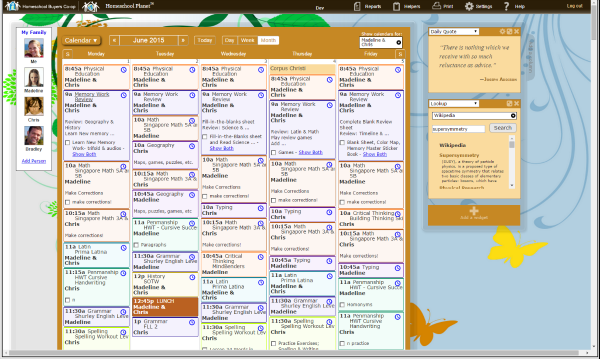
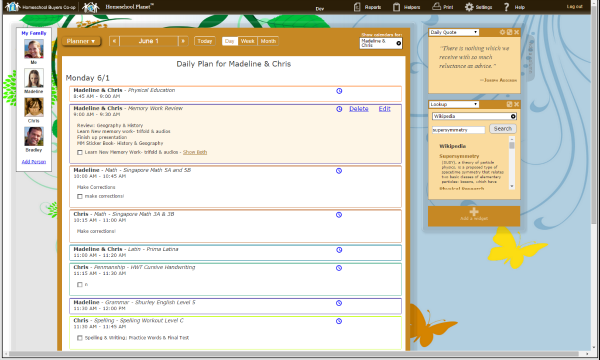
Entering a special event or everything else is rather simple. Even adding classes is made simple as you elect the core subject, title the actual class, select the student or students involved, determine the regular class days (e.g. every weekday, every Wednesday, etc.), when the class begins and ends for the school year, and if there is a set time. Once that portion is complete there is a lesson plan section which includes assignments where a new date range is used to create assignments, notes for each assignment date, grading, hours, and resources for the class.
If you need to make adjustments, you can shift the assignments around to suit the new schedule. Homeschool Planet will let you know when an assignment is not marked complete on the day scheduled when you log in:

When the times comes, Homeschool Planet has you covered with different reports including grades and a transcript option.

How I have been using Homeschool Planet
Since we are mostly on a summer ‘break’, I have not fully utilized all of the features of Homeschool Planet. I’ve played around with different features, but with little to schedule the calendar looks a little empty at the moment. That will not be an issue in about a month when our school year begins again.
Color coding the calendar has been a nice feature for me. I like knowing at a glance what types of appointments we have going on for the day. Somehow the colors make me feel a bit more organized, too.
One feature I am loving is the resources page which is letting me save information for all the subscription based websites that one or more of the boys are using. This means I have an easy, electronic avenue for getting each child’s individual password and they can access it as well. Better yet, I can add it to an assignment so the information is all there. No more excuses about forgetting how to log into a site and get their work done!

Another feature which is neat are the widgets that surround the main section. I have one for an inspirational quote, one for a to do list, and one for shopping list. I can even text the shopping list to my phone or my husband’s if I want. Other options available include a daily Bible quote, weather, look up (searching preset resources like the Bible or Amazon) or messages(to send an email to a particular family member.)
Now, I will admit that I like my pen and paper. The boys need a checklist to know what they are doing and what has been completed. Homeschool Planet allows you to have that tactile experience by printing out what you need. But, I will admit that my hope is they can transition to logging into the program and checking off things as they are finished. Then we can save trees and time by going digital.
Definitely take Homeschool Planet for a spin with their 30 day free trial if you are wanting to find an online method of tracking that can accommodate your entire life, including homeschooling. The more you use it, the more you’ll find it can help with organizing all aspects of life. While I have loved my other homeschool tracking software, it is no longer being updated and fixed for just one computer. Being able to access my information from any browser window along with having a program constantly evolving to do more for me is worth a jump from the old to the new.
How do you organize your (homeschool and other) life?
Would an online resource like this one work well for you?

Don’t just take my word for how we found this to be. Visit the Homeschool Planet Review post on the Schoolhouse Review Crew website to see what other homeschooling parents thought about this and other self-paced courses.
